Network Explainer
2.4 GHz vs 5 GHz Wi-Fi: Which Band Should You Use?
2.4 GHz vs 5 GHz Wi-Fi explained: speed, range and interference, how to see which band your Windows PC uses, and when to pick each one (plus 6 GHz).
On this page
2.4 GHz vs 5 GHz Wi-Fi: 5 GHz is much faster and less crowded but has shorter range; 2.4 GHz reaches further and through more walls but is slower and suffers more interference. Use 5 GHz when you are in the same room or one wall away from the router, and 2.4 GHz for distant rooms and smart-home gadgets. Newer routers also offer 6 GHz, the fastest band with the shortest range.
Most routers broadcast two Wi-Fi networks at once, often with names like "Home" and "Home-5G". Pick the wrong one and you can lose half your speed. This guide explains 2.4 GHz vs 5 GHz Wi-Fi in plain English, shows how to check which band your Windows PC is using, and when each one is the better choice.
What Do 2.4 GHz and 5 GHz Mean?
They are radio frequency bands, like two separate roads for Wi-Fi traffic. Higher frequency carries more data but fades faster through walls and over distance. Lower frequency travels further but carries less, and it is shared with Bluetooth, baby monitors, microwaves and every neighbour's older router.
2.4 GHz vs 5 GHz vs 6 GHz Compared
| 2.4 GHz | 5 GHz | 6 GHz (Wi-Fi 6E/7) | |
|---|---|---|---|
| Typical real speed | 20–150 Mbps | 200–900 Mbps | 500 Mbps–2+ Gbps |
| Range | Longest, best through walls | Medium | Shortest |
| Interference | High | Low | Very low |
| Non-overlapping channels | 3 (1, 6, 11) | Many | Many, wide |
| Device support | Everything | Almost all devices since 2015 | Newer phones and laptops only |
How to See Which Band Your PC Uses
-
In Settings
Go to Settings, Network & internet, Wi-Fi, then your network's properties. Network band shows 2.4 GHz, 5 GHz or 6 GHz, next to the channel and protocol (Wi-Fi 5, 6 or 7).
-
With a command
Open Terminal and run:
Commandnetsh wlan show interfacesRead Band, Channel, Radio type and Signal.
-
With a Wi-Fi analyzer
WiFi Password Viewer includes a Wi-Fi analyzer that lists nearby networks with their signal strength, band and channel, so you can see how crowded each band is around you.
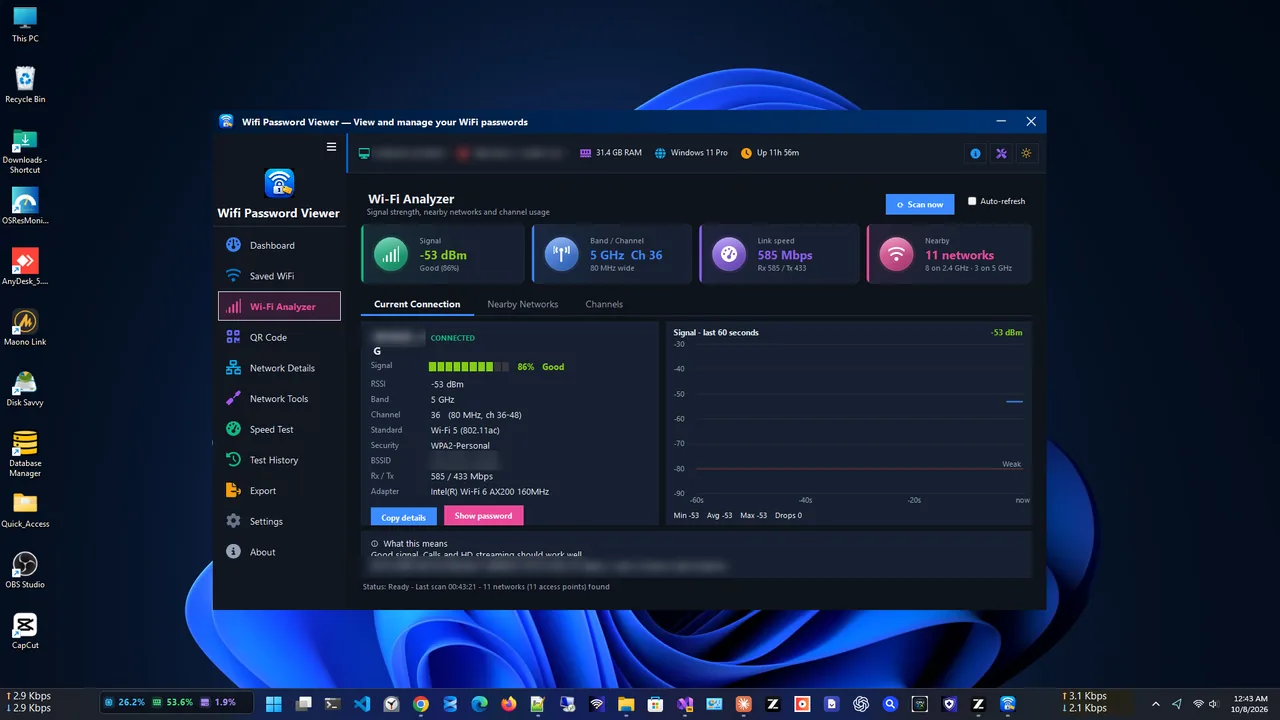
Nearby networks and their signal strength at a glance.
When to Use Each Band
- 5 GHz: laptops, gaming, video calls, 4K streaming, anything within one or two walls of the router.
- 2.4 GHz: the far bedroom, the garden, the garage, and smart plugs, cameras and bulbs, many of which only support 2.4 GHz.
- 6 GHz: the fastest option for new devices in the same room as a Wi-Fi 6E or Wi-Fi 7 router.
- Neither is enough: for a desktop or console far from the router, a cable is better than any band. See Ethernet vs Wi-Fi.
One Network Name or Two?
Many routers use one name for both bands and move devices between them automatically ("band steering" or "smart connect"). It is convenient, but devices sometimes stick to 2.4 GHz. If your PC keeps landing on the slow band, give the bands separate names in the router settings and connect to the 5 GHz one directly. Keep the same password for both so devices do not get confused.
You can also nudge Windows: in Device Manager, open your Wi-Fi adapter's Properties, Advanced tab, and set Preferred Band to 5 GHz if the option exists.
Channels Matter Too
On 2.4 GHz only channels 1, 6 and 11 do not overlap, so in apartments they get crowded fast. On 5 GHz there is far more room. Choosing a quiet channel can double your speed on a busy band; our guide to the best Wi-Fi channel shows how.
Common Myths
- "5 GHz is always faster." Not far from the router. Through several walls, a strong 2.4 GHz signal can beat a weak 5 GHz one.
- "5G Wi-Fi is the same as 5G mobile." No. "5G" in a network name means 5 GHz Wi-Fi, not the mobile network.
- "5 GHz is less safe for health." Both bands are low-power, non-ionising radio within safety limits.
- "Turning off 2.4 GHz speeds up 5 GHz." It rarely helps and can disconnect smart-home devices.
FAQ
Which is better for gaming, 2.4 GHz or 5 GHz?
5 GHz, because it has less interference and lower jitter. A cable is better still.
Why can't my device see the 5 GHz network?
The device may only support 2.4 GHz, it may be out of range, or the router uses a 5 GHz channel the device does not support. Try a channel between 36 and 48.
How far does 5 GHz reach?
Roughly one or two rooms with a strong signal in a typical home. Thick walls and floors cut it quickly.
Do I need a new PC for 6 GHz?
You need a Wi-Fi 6E or Wi-Fi 7 adapter and router, and Windows 11. Many laptops from 2022 on support it.
Conclusion
5 GHz for speed when you are close, 2.4 GHz for range and smart gadgets, 6 GHz for the newest devices in the same room. Check which band your PC uses, and connect to the faster one whenever the signal is strong. For more tools, see all network apps for Windows.